
|
Friendly Cyber Cafe SoftwareDocumentation |
Point of Sale, Cash Drawer
You can sell drinks, snacks and other products to your cyber cafe customers.
Walk-in sale
Use a walk-in sale for guest customers who don't use cyber cafe terminals. Click on the "Walk-in sale" button in the toolbar:

Select an item, enter quantity and press the "Add" button to add the item to bill. Double-click on a item to add it with quantity = 1. Double-click on an item in the bill or press the "Remove button to remote the item from the bill. Press "OK" when finished.
You can use the inventory system to control item Available amount or use your barcode scanner to sell the items.
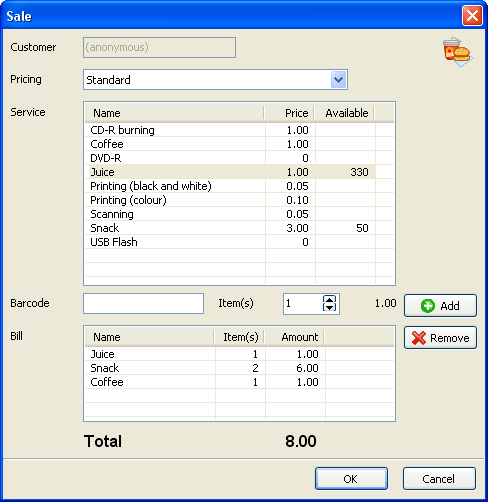
Close the sale. Collect cash, give change and print a receipt if needed. Press the "Paid" button when finished.

Member sale
Member sale is like a walk-in sale, which is made for a particular member.
Select a customer in the list and press the "Sell" button:
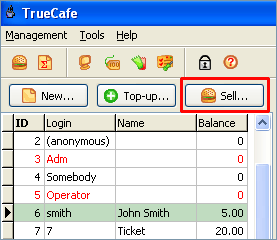
If the member account is pre-paid and there is not enough money left on the balance, you will not be able to make the sale.
Cash drawer
Use TrueCafe main menu > Tools > POS. Cash drawer to connect program to your cash drawer. Cash drawer opens when you change a customer balance or start/extend/stop customer sessions.
TrueCafe. Friendly Internet Cafe Software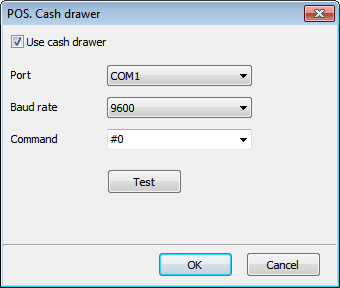
Copyright © 1999-2013 TrueCafe, Ltd.
All rights reserved.