
|
Friendly Cyber Cafe SoftwareDocumentation |
Power Management
TrueCafe power management features allow you to saver power, which actually means to save money, in your cyber cafe.
Shutdown idle or all terminals
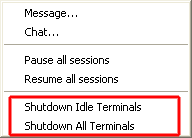
Shutdown idle or all terminals in your cyber cafe by one click in main menu (Tasks -> Shutdown...):
Shutdown idle terminals automatically
You can set a timer which turns off any idle terminal automatically after X minutes has gone. Use options to enable this feature.
Turn on terminal remotely
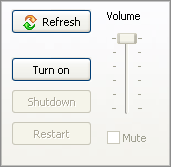
If a terminal is off and you need to start a customer session on it, you can turn it on remotely:
Copyright © 1999-2013 TrueCafe, Ltd.
All rights reserved.