TrueCafe. Friendly Cyber Cafe Software.

General Info    Get Started!    Look Closer    How to...
Administrator
    1. Terminals and Applications
    2. Pricing
    3. Customers
    4. Tickets (Time Codes)
    5. Pre-Paid and Post-Paid Sessions
    6. Point-of-Sale
    7. Inventory
    8. Instant Messenger (Chat)
    9. License Key Management
    10. Power Management
    11. Daily Report
    12. Traffic Calculation and URL Log
    13. Point-of-Sale. Receipt
    14. Options
  Client
Reports
Web Reports
Printer Watcher
NComputing and Terminal Server Support
Wi-Fi hotspot support (wireless billing)
Database Cleanup
Language Editor
Database Workshop
Server Manager

Customers

There are three types of customer accounts in TrueCafe:

1. Anonymous. This is a customer account which you can use for any customer.

2. Member. Any customer which has balance in your cyber cafe. You create member accounts manually.

3. Ticket (time code). Pre-generated account which can be sold to any customer. You generate a number of tickets for further use.


Customer account

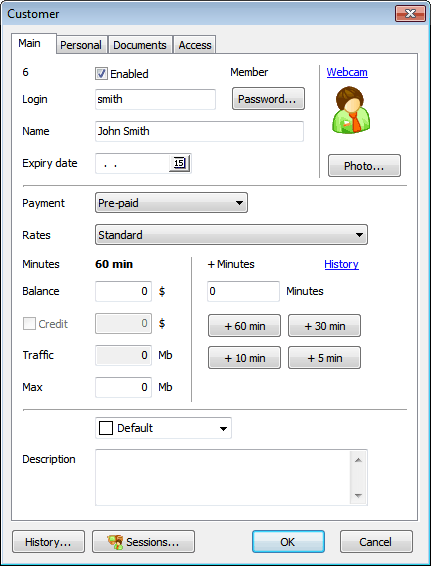
Property Meaning
Enabled Whether this account can be used to login to cyber cafe terminal
Balance Amount of money that is left on the account
Credit Maximum amount (negative) which a customer owes your cyber cafe (negative). When a customer balance exceeds credit amount, neither a session can be started nor an item can be sold to the customer.
Pricing Pricing package. If assigned, the customer can't select another one when logging in.
Read more about pricing
Payment Pre-paid or post-paid method
Read more
Time left Approximate amount of time left based on customer balance and selected pricing current rate
Colour box Highlight a customer account in the customers list and the sessions list


Top-up (put some money) account

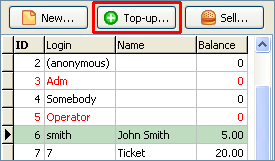
Select a customer in the list and press the "Top-up" button:
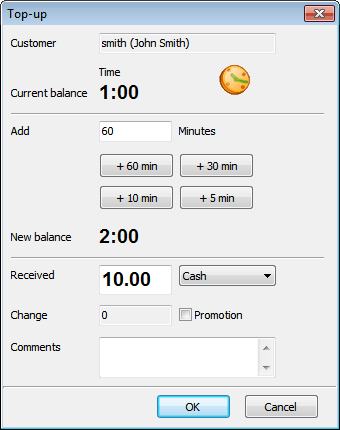
Enter amount of money to put onto account and amount of cash received (if differs), select the method of payment (cash, credit card):

Virtual cash

You can use the "virtual cash" concept to top-up an account without putting real money onto it. Virtual cash doesn't impact your financial reports.


Security

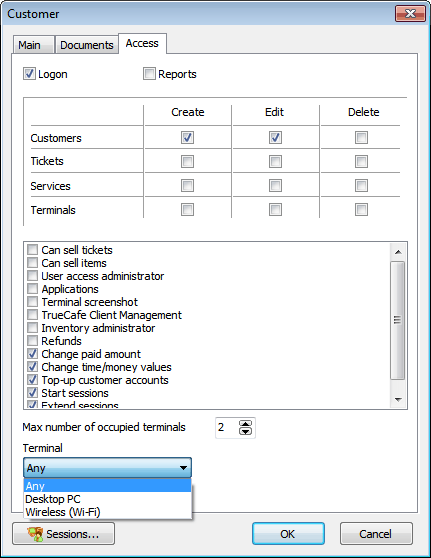
Only a supervisor account (Adm) or a "User access administrator" can change user security settings.

Option Meaning
Login Can login into TrueCafe Administrator. Such users are highlighted by red in the customer list
Reports Can login into TrueCafe Reports
User access administrator Can change user security settings
Applications Can configure terminal profiles and use "private" applications in TrueCafe Client
Terminal screenshot View remote terminal screenshots
TrueCafe Client Management Can close TrueCafe Client remotely
Max number of occupied terminals How many terminals can be occupied using this account simultaneously
Inventory administrator Configure inventory, add and remove items
Refunds Make refunds

Adm account rule. Administrator account (Adm) security settings can be changed only by Adm himself. Administrator can change the security settings for any user account.

Login name rule. An operator can set an account login name when he creates a new user account. An operator can't change his own login name. An administrator and user security administrators can change any login name.

Password rule. An operator can set a password when he creates a new user account. Any user can change his password. An administrator and user security administrators can change any password.

Enable/disable account rule. Only administrator and user security administrators can enable/disable a user account.

TrueCafe. Cyber Cafe Software
Copyright © 2008 TrueCafe, Ltd
All rights reserved.